
Log in with your password
- Go to the Log in page.
- Enter the email address associated with your Executive Board account.
- Enter your password and select Log in.
Log in with a One-Time Password (OTP)
Use a One-Time Login Password (OTP) if you would like to sign in quickly or cannot remember your password.
- On the login page, select Use one-time login password.
- Enter the email address associated with your Executive Board account.
- Check your email for the OTP code.
- Enter the code on the login page.
Note: OTP codes are valid for a limited period and can only be used once.
I forgot my password
- Go to the Log in page.
- Select Forgot your password?
- Enter the email address associated with your account.
- Follow the instructions in the password reset email.
Create a new password and log in.
Password reset emails may also be sent automatically for security reasons or after periods of account inactivity.
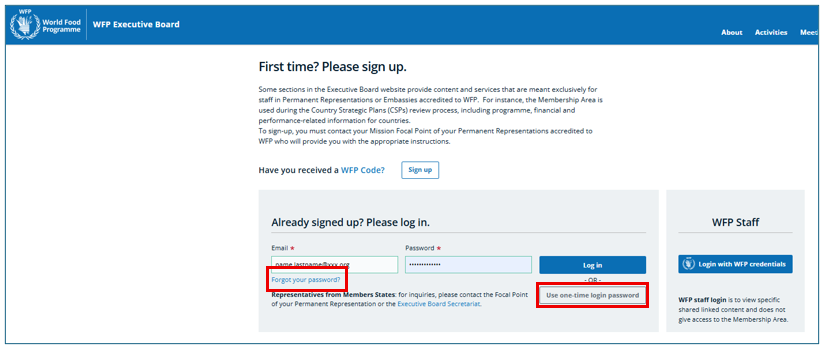
WFP staff: log in with your WFP credentials.
External users: if your account was created by the Executive Board Secretariat, please follow the instructions in your activation email to set your password before logging in for the first time.