
How do I join a meeting online (Zoom)?
For virtual participation (where available), follow these steps:
Step 1: Inform the Executive Board Secretariat that you will participate virtually.
- The Secretariat will register you for online participation and send a personal confirmation email to the email address associated with your Executive Board website account.
Step 2: Log in to the Executive Board website with your account credentials.
- If you do not have an account and are part of a Permanent Mission, please contact your Mission Focal Point.
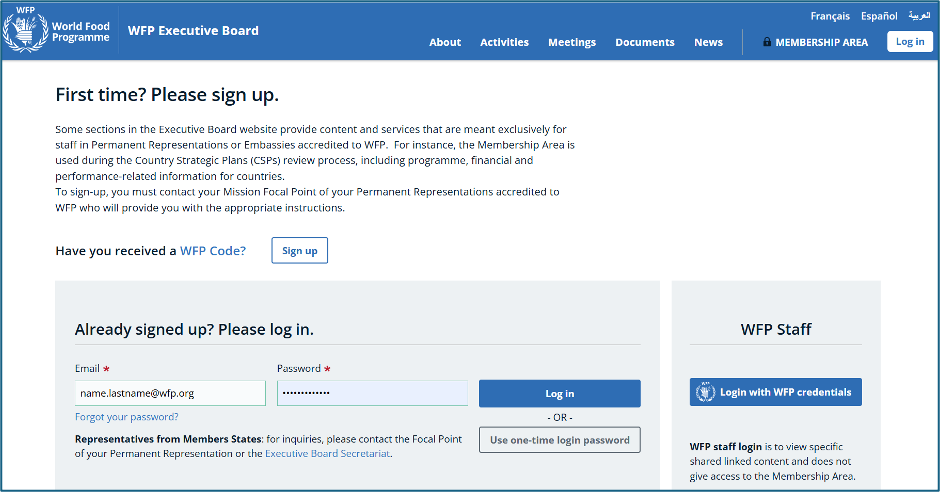
Step 3: Access the meeting on the day of the event through the Executive Board website.
- If you do not remember your password, please see the Log in - FAQ page for detailed instructions.
Step 4: Open the meeting page and select Join once enabled.
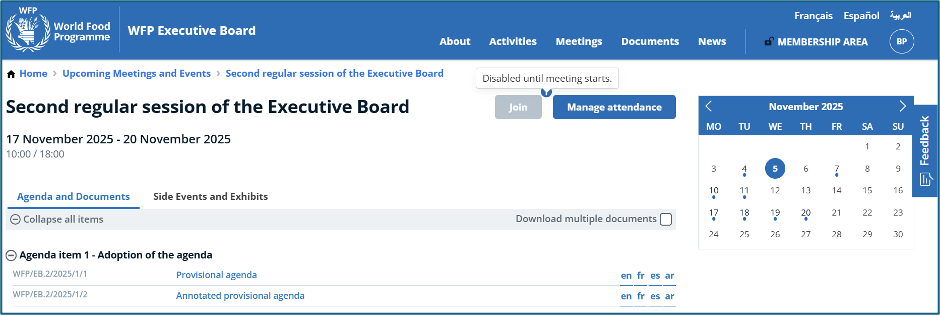
This image is provided for illustrative purposes only.
Step 5: Follow Zoom instructions to join the meeting.
I am registered but cannot access the meeting online. What should I do?
Please ensure that:
- You are logged in using the email address associated with your Executive Board account.
- You have communicated your attendance to the Executive Board Secretariat, and have received a confirmation notification.
-
You can see the Join button on the webpage of the meeting you are trying to access.
I am still experiencing issues. What should I do?
Please contact wfpsecretarytotheeb@wfp.org