
How do I register for a meeting?
Inform the Executive Board Secretariat of your intended participation through your Mission Focal Point or by sending an email to wfpsecretarytotheeb@wfp.org, indicating whether you will participate in person or online.
Once the registration is processed, you will receive a confirmation notification. If you have confirmed your attendance with the Executive Board Secretariat but have not received a notification, please contact the Secretariat for assistance.
When should I register for a meeting?
We encourage attendees to communicate their attendance to the Executive Board Secretariat as early as possible to help ensure a smooth experience.
Registration requests submitted shortly before a meeting may result in delays in processing, access to online participation, or receipt of meeting notifications.
How do I get access to an online meeting?
Registered attendees can access online meetings through the Executive Board website using their Executive Board account. For detailed joining instructions:
- Registered meeting attendees: see the Joining a meeting online FAQ to join online
- WFP staff: see the WFP staff joining Executive Board meetings FAQ
How do I join a meeting online?
Please refer to the Joining a meeting online FAQ for step-by-step instructions on accessing meetings through the Executive Board website.
Can I change my meeting attendance format?
Yes.
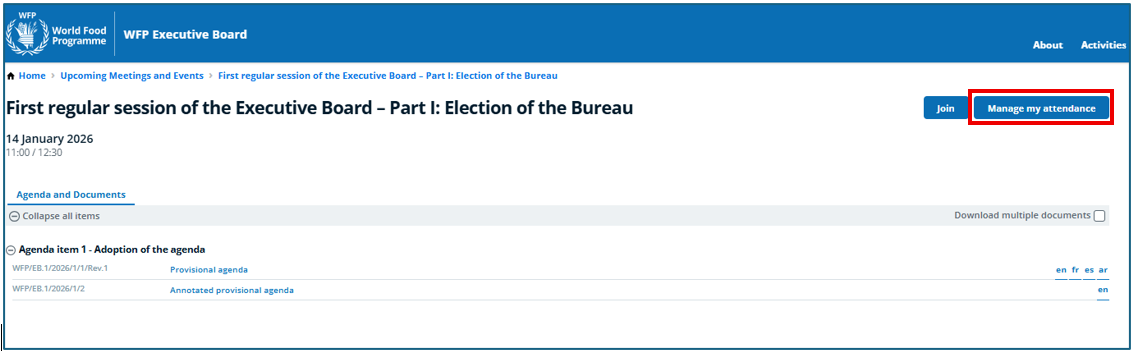
If your participation plans change, you may update your attendance type through the Manage my attendance feature. Indicating your preferred format, online or in-person, will assist our logistics and help ensure a smoother experience for you.
Can someone else register on my behalf?
Yes.
Registration requests are typically coordinated through your Permanent Representation's designated focal point, who communicates attendance information to the Executive Board Secretariat.
I am registered but cannot access the meeting online. What should I do?
Please ensure that:
- You are logged in using the email address associated with your Executive Board account.
- You have communicated your attendance to the Executive Board Secretariat, and have received a confirmation notification.
-
You can see the Join button on the webpage of the meeting you are trying to access.
I am still experiencing issues. What should I do?
Please contact wfpsecretarytotheeb@wfp.org